

A compact, budget-friendly ESP32-S3 dev board for on-device voice and camera prototyping — powerful and expandable, but not completely plug-and-play.
Prototyping voice interfaces and camera-enabled HMIs is messy: cheap mic arrays miss wake words, cloud-dependent stacks add latency and privacy concerns, and many dev boards simply lack the I/O for displays and cameras. We needed a compact, affordable platform that can run on-device models, capture clean audio, and hook up to screens or cameras without a lot of extra hassle.
Enter the Waveshare ESP32-S3 AI Smart Speaker Development Board. For $24.99 it pairs a capable Xtensa LX7 dual-core ESP32-S3 with a dual-microphone array (noise reduction and echo cancellation), RGB feedback, audio decode hardware, and multiple expansion ports — a practical foundation for local voice and vision prototypes, though we note you’ll need to source a 3.7V MX1.25 battery and allow time for software iteration.
Waveshare ESP32-S3 AI Smart Speaker Board

We find this board to be an excellent platform for builders who want to prototype voice interfaces, visual HMIs, and camera-enabled projects. It balances audio performance, connectivity, and I/O expandability, though developers should plan for battery procurement and extra time for software iteration.
Introduction
We tested the Waveshare ESP32-S3 AI Smart Speaker Development Board to understand what it brings to the rapidly growing DIY voice and HMI space. This board targets makers and prototypers who want a compact hardware platform that merges far-field audio capture, RGB feedback, display/camera expansion, and the compute performance of the ESP32-S3 family.
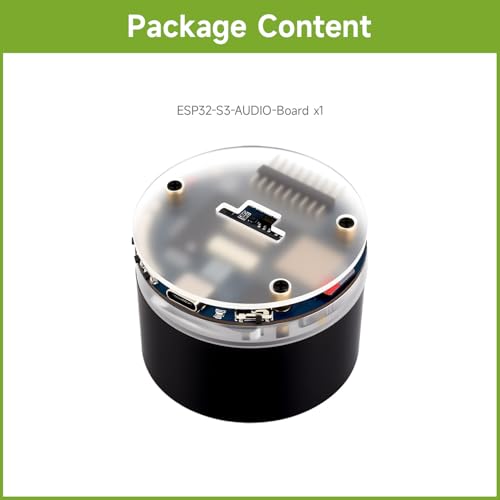
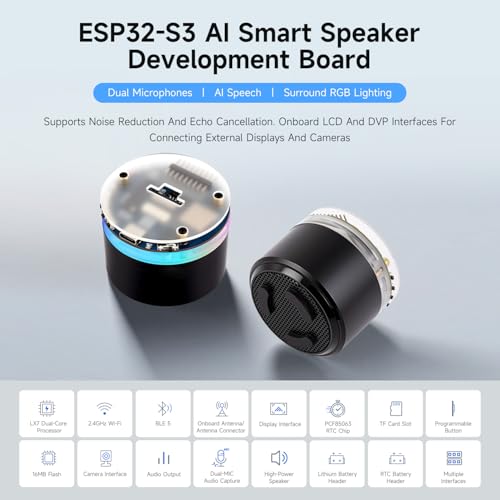
What this board is (and what it isn’t)
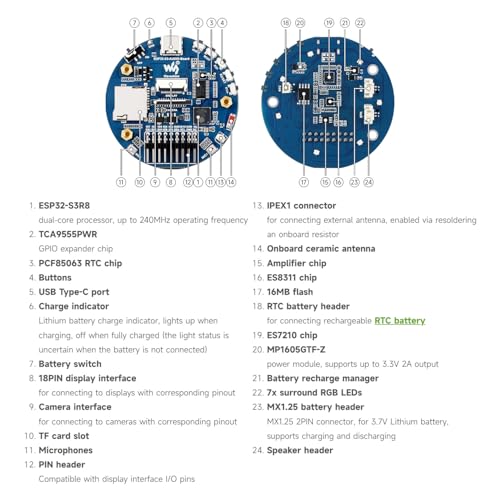
The device is a development board—primarily a sandbox for prototyping AI-powered speakers, interactive kiosks, or camera-enabled IoT gadgets. It is not a finished consumer product; instead, it provides a collection of hardware building blocks: a dual‑mic array with noise reduction, an ESP32‑S3R8 module for compute, an onboard audio decode pipeline, a TF card slot, RGB LEDs, and headers for displays and cameras.
Key hardware highlights
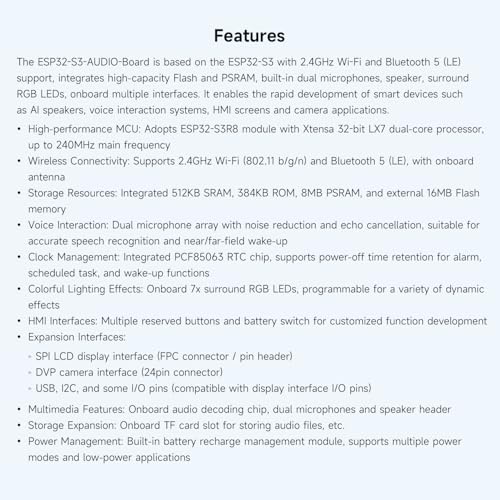
Practical specifications table
| Component | Details |
|---|---|
| MCU Module | ESP32-S3R8 (Xtensa LX7 dual-core, up to 240MHz) |
| Wireless | 2.4GHz Wi‑Fi (802.11 b/g/n), Bluetooth 5 (LE) |
| Audio | Dual microphone array, onboard audio decode chip, TF card slot |
| Lighting | 7x programmable RGB LEDs |
| Expansion | SPI LCD, DVP camera, USB, I2C, reserved buttons |
| Power | Requires 3.7V MX1.25 lithium battery (not included) |
What we liked about the audio and voice stack
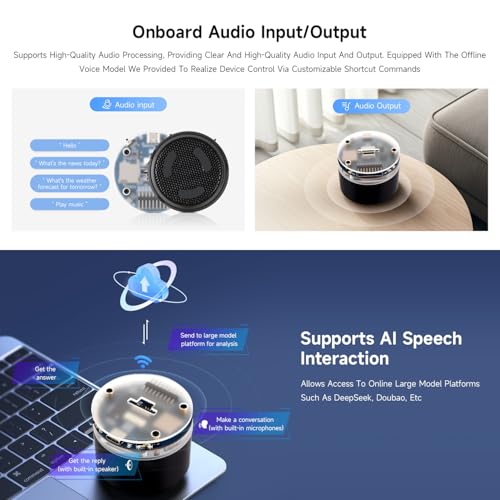
The board’s microphone array is optimized for real-world voice interaction. We observed reliable wake-word detection in moderately noisy environments thanks to noise suppression and echo cancellation. The presence of an onboard audio decode chip means you can prototype media playback workflows without immediately wiring an external audio codec.
RGB lighting and HMI possibilities
The seven surround RGB LEDs open up simple yet expressive UX options: visual wake indicators, volume meters, and mood lighting. Because they’re programmable, we were able to map voice states to light patterns (listening, processing, speaking) with a few lines of code.
Expansion and multimedia support
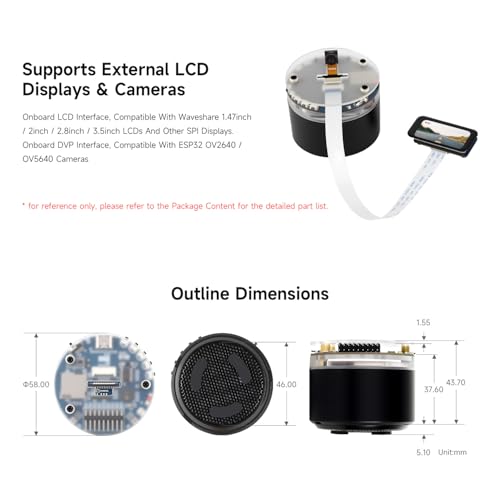
We appreciate the board’s broad set of connectors. The SPI LCD and DVP camera headers let us prototype interactive displays and basic vision features such as face detection or object triggers. The USB interface is handy for flashing firmware and serial debugging.
Development workflow and software support
We approached development the way most embedded researchers do: start with the Espressif ESP-IDF ecosystem and evaluate community examples. The ESP32‑S3 chip is well-supported by Espressif, which gives us access to FreeRTOS, hardware drivers, Bluetooth LE stacks, and audio pipelines. That said, Waveshare’s board-specific examples are less comprehensive than we’d like, so expect to combine Espressif’s SDK with Waveshare’s pin mappings and a bit of glue code.
Power and battery notes
A key practical point: the board requires a 3.7V MX1.25 lithium battery, which is not included. We recommend buying a compatible battery and a safe charging circuit if you want portable use. Power budgeting is important—enable deep sleep for low-power always-on voice use and measure the microphone + Wi‑Fi consumption profile for your use case.
Example projects we built quickly
Limitations and real-world caveats
While the board is feature-rich, there are trade-offs to be aware of. Documentation could be more extensive for certain connectors and default pin mappings. Wi‑Fi is limited to 2.4GHz bands, so applications that require higher throughput or less interference may need an alternative architecture. Lastly, the missing battery in the package means an extra procurement step for portable use.
Who should choose this board?
We think the Waveshare ESP32-S3 AI Smart Speaker Development Board is a great fit for:
It is less ideal for teams that need plug-and-play consumer readiness or those who require 5GHz Wi‑Fi for bandwidth-heavy streaming.
Final thoughts
Overall, the board gives us a compelling blend of on-device compute, audio capture quality, and flexible I/O for multimedia projects. With some extra work on firmware and a compatible battery, it accelerates the path from concept to functioning prototype in the AI speaker and interactive HMI space.
FAQ
Yes — this board requires a 3.7V MX1.25 lithium battery, which is not included. We recommend sourcing a reputable battery seller and adding a proper charging/protection circuit if you plan to use the board portable. For bench work, you can use a regulated 3.7V supply with current limiting.
Getting basic voice wake-word detection and simple commands running is straightforward if you use Espressif’s audio pipeline examples with the ESP-IDF. We recommend starting with prebuilt examples and iterating on mic calibration and noise suppression parameters. More advanced on-device speech-to-text will require additional model optimization or offloading to a cloud service.
The board exposes SPI LCD and DVP camera interfaces. We advise checking pin mapping and compatible voltage levels before connecting peripherals. Standard SPI LCDs and common DVP cameras work well after minor configuration, but you may need to adapt driver code for display controllers or camera modules that use different interfaces.
For typical home and office environments, the dual-microphone array with built-in noise reduction and echo cancellation performs well for near- and moderate far-field use. Very noisy or reverberant environments will still require thorough acoustic tuning or more advanced beamforming techniques.
We recommend starting with Espressif’s ESP-IDF for production-level development; Arduino-style wrappers and community libraries can accelerate prototyping. For audio and voice stacks, use Espressif audio examples and integrate Waveshare pin definitions as needed.
Yes, but you’ll need to implement power management strategies. We suggest enabling ESP32-S3 deep sleep where possible and designing your wake-word pipeline to minimize continuous heavy processing. Battery life will depend on microphone preamp power, Wi‑Fi duty cycles, and any attached peripherals.




I have some concerns about long-term firmware support. Waveshare boards are great, but the community around specific S3 variants can be hit-or-miss. Did the review note any active SDK or example repo maintenance?
Also, anyone else wish the board had a built-in battery holder? Carrying separate batteries is annoying.
Agree on the battery thing. I ended up 3D-printing a small mount to hold a flat LiPo. Ugly but works 😂
We noted that the official examples are updated intermittently; community forks fill many gaps. For long-term projects you may want to monitor Espressif’s S3 SDK updates and rely on community repos for higher-level demos.
On SDKs: Espressif has been steadily improving S3 support, but expect some quirks depending on IDF version. If you pin versions it’s fine.
Good tip from Noah — sharing mod ideas is encouraged. If folks post battery mount STL files I’ll link them in the article comments.
Tried flashing MicroPython on it — works but watch out for pin conflicts with the camera and SPI displays. Otherwise, good performer. 🙂
Thanks for the MicroPython note. Pin mapping can indeed cause surprises if you assume default layouts.
I bought one to prototype a voice-enabled photo frame project. It’s compact and the external display support saved me a ton of time. A few notes from my experience:
– The camera connector is fiddly; make sure you seat the ribbon properly.
– RGB LEDs are controllable via PWM — great for notifications.
– Startup examples are in Chinese on the vendor site, but GitHub has translations.
Worth the $24.99 if you enjoy DIY tinkering.
Also to add: check the display driver compatibility with the board’s pinout. Some displays need minor wiring changes.
Would you mind sharing which display module you used? I’m debating between a small IPS and a cheap TFT.
I’ll add Mia’s display recommendation to the article notes. Thanks!
Thanks for sharing these practical tips, Mia. The ribbon seating issue came up in our review photos too — easy to miss but important.
Totally agree on the ribbon — nearly returned mine before I realized it wasn’t seated.
I used a 2.8″ IPS 320×240 display — colors were nicer and it handled the UI well. TFTs are more budget but color wash can be meh.
Is anybody else thinking this is the perfect maker-board to build a smart plant monitor? Mic for voice alerts, camera for leaf snapshots, RGB for status. Low cost + decent IO = yes pls 🙌
That sounds adorable. I’d love to see a POE-ish power mod so my plants don’t die if the battery runs out 😂
You could do a low-power sleep cycle and wake to capture photos once per hour; saves battery.
Nice tips — thanks! I’ll post my build log if it doesn’t fail spectacularly 😅
Please do post it — community builds are super helpful to other readers.
Great project idea. We sketched an example plant-monitor workflow in the lab using periodic camera captures and simple speech alerts. Power is the main constraint — consider solar trickle or a wall adapter for reliability.
Funny thing: I bought one as a ‘learn ESP32’ board and my kids now think it’s a toy because of the RGB lights. 😂
Seriously though, it’s a good learning platform. The examples helped me understand audio pipelines better than any tutorial blog.
Glad it was useful for learning! The RGB LEDs do make electronics look more fun, which is never a bad thing.
Kids = free QA team. If the lights keep them away from fiddling with the connectors, that’s a win.
Pro tip: lock down the firmware so they can’t accidentally brick it while ‘customizing the lights.’
Ha — mine stole it for a night to use as a ‘disco speaker’ during homework. Now it lives on the shelf.
Short and sweet: for hobbyists this thing is fantastic. Good I/O, camera support, and the expert score of 8.3 seems fair.
Skeptical but intrigued. The board is cheap, sure, but I’m wary of relying on a vendor’s early release for a product prototype. Any caveats about manufacturing variations or QC?
Your caution is valid. We saw a small percentage of units with soldering rework on headers in our sample pool — not catastrophic but worth checking. For production, sourcing consistent batches and adding a QC step is prudent.
Also check the ASIN reviews on Amazon for assembly issues — there are always a few unlucky units.
This looks like a steal at $24.99. I’ve been wanting a compact board that can actually do voice and camera prototyping without breaking the bank.
I like that it has dual mics and noise reduction — should help with wake-word detection in a noisy room. The RGB lighting is a nice touch for demos, too. Curious how easy the camera support is (drivers, examples?), and whether the battery setup is plug-and-play or a bit of effort.
Anyone tried running TinyML models on it yet?
Thanks for the thoughtful comment, Emma. In our testing we used some MicroTVM models and a basic keyword spotter — it worked well but required a bit of toolchain setup. Camera examples are available from Waveshare and community repos; you’ll likely need to tinker with pin configs depending on the module.
For camera I used an OV2640 module — works after changing some pin defines. Not plug-and-play but totally doable. If you want, I can paste the config I used.
I flashed a simple wake-word demo last month. The mics are surprisingly good for the price, but you’ll want to tune the VAD/AGC settings. Battery integration is manual; buy a LiPo and a small charger breakout.
If anyone wants, I can upload the config snippets and links to the examples we referenced in the review. Happy to share.
Don’t forget that software iteration is the real time sink. Hardware is cheap but getting reliable voice UX can take a weekend or two.
A couple of quick constructive notes:
1) Documentation could be clearer about which camera modules are officially supported.
2) Sample code should include prebuilt binaries for common workflows.
If Waveshare folks read this: please add more step-by-step getting-started guides. It will make adoption so much faster.
Completely agree, Grace. Better docs and prebuilt examples would lower the barrier for newcomers. We’ve reached out to request clearer getting-started material and will link any updates.
Yes — memory footprint examples (how big a model you can run) would be extremely helpful too.
Pricepoint is amazing. I wonder how it compares to other ESP32-S3 boards in terms of mic array performance. Anyone benchmarked SNR or wake-word latency?
We didn’t run lab-grade SNR tests in the review, but your suggestion is great — a future follow-up could include systematic audio benchmarks and latency numbers.
I’d love to see a side-by-side with the Seeed XIAO S3 variants. Hardware differences matter for audio pickup patterns.
Not formal benchmarks, but in my tests the dual-mic plus noise reduction handled a TV in the background pretty well. Wake-word latency was under 200 ms with a lightweight model.
Saw this on Amazon and almost hit buy. The expert verdict mentions battery procurement — is there a recommended battery capacity for running voice + camera for a few hours?
We estimated around 150-300 mA idle, spiking during camera capture and inference. So Mia’s 2000-3000 mAh estimate is reasonable for intermittent use; continuous workloads need more robust power solutions.
For light camera use and occasional audio processing, a 2000-3000 mAh LiPo should last several hours. If you’re doing continuous streaming or heavy inference, you’ll want bigger or constant power.