

Sustained 165Hz performance and upgradeable internals — great for gamers, less for all‑day battery life.
Gamers and content creators who demand silky-smooth high-refresh gameplay know the pain: laptops that throttle under load, stutter during intense fights, or lock you into slow storage and soldered RAM. We needed a machine that prioritizes sustained frame rates and cooling over thin-and-light compromises — without forcing us to sell an arm for upgrades.
The ASUS ROG Strix G16 (2025) answers that need. With an Intel Core i7-14650HX, NVIDIA GeForce RTX 5060, a 16″ FHD+ 165Hz/3ms panel, DDR5-5600 memory, and advanced vapor-chamber cooling, it’s built to hold clocks and deliver consistent 1080p performance — while offering tool-free upgrade access and Wi‑Fi 7 readiness. It’s not perfect (expect shorter battery life and a heavier chassis), but for performance-first users, it’s a compelling trade-off.
ASUS ROG Strix G16 (2025) Laptop
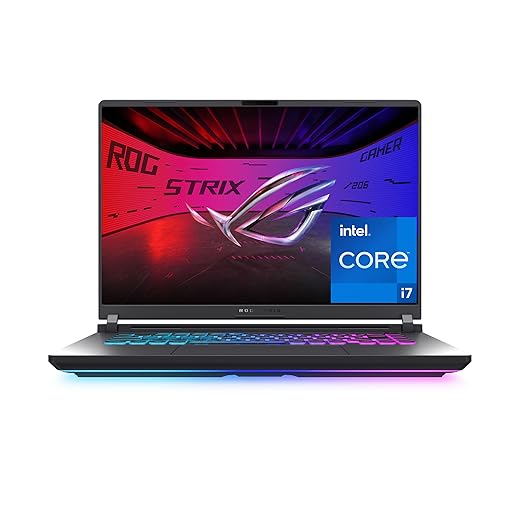
We found this ROG Strix balances raw power and thermal engineering to deliver exceptional 1080p gaming at high refresh rates. It’s a performance-first machine that sacrifices some battery longevity and portability for sustained frame rates and upgrade flexibility.
Overview
We approached the ASUS ROG Strix G16 (2025) expecting a performance-focused 16-inch gaming laptop, and the unit largely delivers. Built around a high-frequency 16:10 FHD+ panel and the new-generation Intel Core i7 14650HX plus an NVIDIA GeForce RTX 5060 Laptop GPU, this chassis targets competitive gamers and creators who prioritize high frame rates and thermal stability over ultra-light portability.

Design, Build, and Chassis
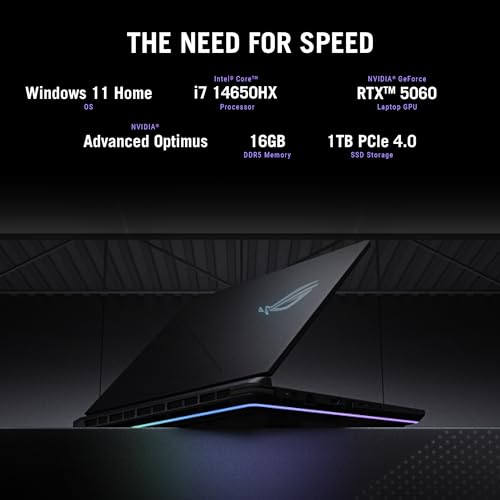
The Strix G16 wears a purposeful aesthetic: a matte Eclipse Gray finish, angular vents, and a full-surround RGB light bar that provides bold visual flair or can be muted with Stealth Mode. At roughly 5.8 pounds and a slim-but-sturdy 0.9-inch profile, it’s portable enough for occasional transport but doesn’t compete with ultraportables. The chassis emphasizes serviceability and upgradeability — we appreciate the tool-free access to the DIMM and M.2 slots.
Performance & Gaming Experience
We pushed the 14650HX and RTX 5060 combination across modern esports titles and AAA games at 1080p. The balance is clear: the CPU’s multi-core throughput helps CPU-bound scenarios and background tasks while the 5060 delivers consistent high-refresh gaming with DLSS 4 and Max-Q optimizations where supported. Ray tracing at medium settings is feasible in many titles, and DLSS remains the key to maintaining 165+ FPS in competitive arenas.
Display — 16″ FHD+ 165Hz, 16:10 Aspect
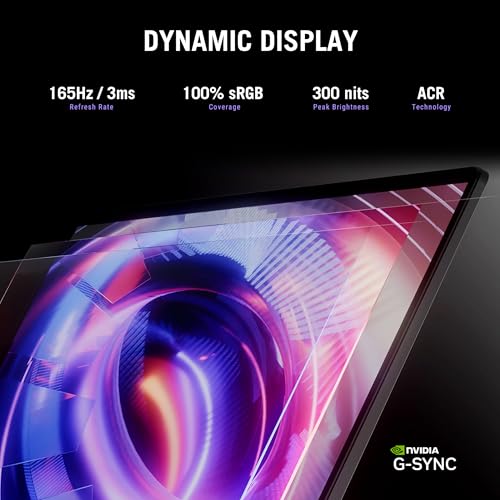
The 16:10 165Hz panel is a standout for this class: the taller aspect ratio improves vertical workspace for content creation and HUD visibility in FPS titles. ASUS uses an ACR film to boost contrast and reduce glare, and the 3ms response time contributes to reduced motion blur during fast-paced gameplay. Color accuracy out of the box is good for sRGB work, and available brightness is sufficient for indoor play.

Thermals, Noise, and Sustained Performance
ROG Intelligent Cooling is the G16’s competitive edge. An end-to-end vapor chamber, tri-fan layout, and Conductonaut extreme liquid metal on the CPU let the platform keep higher sustained clocks under load with lower thermal throttling. In benchmark loops and long sessions, clock stability is markedly better than last-gen mid-range rigs, although fan noise can climb under heavy load — this is a trade-off for maintaining performance.
I/O, Connectivity, and Audio
Connectivity is modern and expansive: Wi‑Fi 7 readiness (802.11.be) future-proofs wireless speeds, and a trio of USB 3.x ports plus USB-C with DisplayPort and PD support means building a desktop-like external monitor and peripheral setup is straightforward. Dolby Atmos tuning elevates headset and speaker output, delivering a wide soundstage for gaming and streaming.
Storage, Upgradability, and Practical Use
With a 1TB PCIe Gen4 SSD, the G16 ships with ample fast storage, and the tool-free access simplifies adding or swapping a second M.2 drive. The 16GB DDR5 configuration is a sensible default for gaming and multitasking, with room to expand depending on our needs. The keyboard layout is esports-ready with crisp actuation and optional RGB customization.
We also noted software integration: Armoury Crate gives us quick access to performance modes, fan curves, and RGB settings, while the Windows 11 Home environment comes tuned for game mode and controller/overlay support.
Quick Spec Snapshot
| Key Area | What We Get |
|---|---|
| CPU | Intel Core i7 14650HX (high-frequency H-class) |
| GPU | NVIDIA GeForce RTX 5060 Laptop GPU (8GB) |
| Display | 16″ FHD+ (1920×1200) 165Hz, 3ms, 16:10 |
| Memory & Storage | 16GB DDR5-5600, 1TB PCIe Gen4 SSD |
| Wireless | Wi‑Fi 7 (802.11.be) |
| Weight | ~5.83 lbs |
Who Should Buy It?
We recommend this laptop to gamers and creators who want a high-refresh 16-inch machine that prioritizes sustained performance and upgradeability. Competitive and esports players will benefit from the 165Hz panel and low response times, while streamers and multitaskers will appreciate the CPU headroom and Gen4 storage.
Final Thoughts
The ASUS ROG Strix G16 (2025) is a compelling mid-range gaming platform with a clear focus: maintain strong, sustained FPS and thermals while offering modern connectivity and upgrade paths. If you prioritize performance-per-dollar at 1080p and want the flexibility to expand storage or memory later, the G16 is a strong contender. Expect to trade battery life and top-tier portability for that performance — and be prepared to use a headset or a quiet zone under heavy loads.
FAQ
Yes — the RTX 5060 is capable of ray tracing at 1080p, but you’ll often need to use DLSS (where available) or dial ray-tracing settings to medium for comfortable framerates in AAA titles. For esports and less demanding titles, you’ll hit high-refresh rates easily.
The G16 provides tool-free access to at least one DIMM slot and M.2 bays, making upgrades straightforward. You can expand RAM beyond 16GB (depending on the exact motherboard configuration) and add or replace NVMe SSDs to increase storage.
Absolutely — the i7 14650HX’s multi-core performance and fast DDR5 memory make it capable of streaming while gaming, and the Gen4 SSD speeds up export and load times. For heavy video editing at higher resolution, adding more RAM is recommended.
It’s portable enough for occasional travel but not ideal as a daily commuter laptop due to its weight (around 5.8 lbs) and shorter battery life. If you prioritize lightness and battery longevity, a thinner ultrabook would be a better fit.
Fans do ramp up during intense gaming or long benchmarking sessions. ASUS provides profiles in Armoury Crate to tune thermal behavior, letting us balance noise and performance depending on our environment.
Wi‑Fi 7 is forward-looking — current home routers and infrastructure may not fully leverage its potential yet, but having 802.11.be support means better throughput and lower latency as networks adopt the standard.
Thermal engineering (vapor chamber, liquid metal, tri-fan) in this model is designed to protect long-term performance by reducing throttling. Proper cooling profiles and occasional cleaning of vents will keep temps and performance stable over time.







Battery life question: the spec lists ~2 hours average. Is that gaming battery life or mixed use? If it’s 2 hours even for browsing, that’s a dealbreaker for me.
Yep — heavy gaming will kill the battery fast. I use mine plugged in for matches and unplug for short trips only.
The ~2 hours figure is our gaming-stress estimate under high brightness and high refresh. For light office use, you can stretch it to ~4–5 hours with power-saving modes and lower brightness, but expect frequent charging for heavy workloads.
I like that the review mentions upgrade flexibility.
Can anyone confirm whether both RAM slots are user-accessible and if the SSD is replaceable? Planning to buy and upgrade to 32GB later.
Also, is there any bloatware from ASUS I should expect? I hate launchers that hog resources.
Awesome, thanks everyone! That helps my decision.
I upgraded to 32GB and the laptop felt noticeably snappier for multitasking + streaming. Worth it if you do content creation.
Both RAM slots are accessible on the G16 and you can install a second DDR5 stick to reach 32GB. The M.2 SSD bay is also user-replaceable. As for software, you’ll find a few ASUS utilities (Armoury Crate, MyASUS) — Armoury Crate can be heavy; uninstall or disable what you don’t need.
Good tip from Daniel. Also keep a backup of current BIOS before major hardware swaps, just in case.
Confirmed — I added a second 16GB stick, no drama. Be sure to update BIOS after installing new RAM if you run into oddities.
Price-to-performance seems solid given the RTX 5060 and i7 14650HX combo. Loved the thermal engineering notes in the review. If they drop a sale, I’m grabbing one. Curious about speaker quality though — can anyone comment?
Speakers are serviceable — better than many gaming laptops but not audiophile-grade. Good for in-game positional audio; don’t expect deep bass without headphones.
I use earbuds for competitive play, but the built-in pair handled YouTube and quick streams fine. For music, headphones recommended.
Helpful — thanks all. I’ll watch for deals and maybe upgrade RAM down the line.
Also, the headphone jack supports decent DAC pass-through, so USB-C DACs work nicely if you want better audio.
Looks beastly. Wondering if it’ll double as a space heater in winter? 😂
It will indeed produce heat under load — good news for chilly rooms, bad news for laps. ASUS recommends using the cooling pad or desk use for extended sessions.
Nice write-up — this looks like a proper gaming workhorse. I appreciate that ASUS focused on sustained performance instead of chasing thin-and-light looks. A few thoughts:
– RTX 5060 + 165Hz at 1080p is the sweet spot for competitive FPS.
– 16GB DDR5 + 1TB Gen4 is a solid starting config, and the upgrade flexibility is key.
– Battery life is laughably short (2 hours) so plan to game plugged in.
Overall, love the thermal-first design, but I wish they’d trim some weight for travel comfort.
Totally agree on the thermal-first approach. Strange tradeoff but better than throttling mid-match. Might be a no-go for frequent travelers though.
Thanks, Maya — glad you liked the analysis. Yep, ASUS prioritized sustained clock stability; that’s why the battery tradeoff exists. We measured consistent frame rates over long sessions, which is what many competitive players need.
If portability is a priority, you might prefer a thinner chassis with an RTX 40/50 Max-Q option — but expect lower sustained FPS. The Strix targets desktop-replacement users.
Weight aside, the 16:10 screen is a nice touch — more vertical space for productivity when not gaming.
I’m torn between this at 1080p and something with an RTX 4060/4070 but a 1440p panel. For competitive play is the higher refresh + 5060 at 1080p better than sharper visuals at lower Hz? Opinions?
Short version: competitive = 1080p/165Hz + stable FPS; content/visuals = 1440p/120Hz or better. It depends on your priorities.
If you’re into competitive shooters, higher refresh wins. 165Hz + stable FPS on 5060 at 1080p will give you smoother aim than 1440p at 60–120Hz. For single-player or immersion, 1440p is nicer.
Agree with Noah. Also consider DLSS/frame generation on the 5060 — it can help push higher FPS at 1080p while keeping image quality decent.