

Is this the RTX 4090 laptop that finally replaces your desktop?
We’ve been waiting for a laptop that actually behaves like a portable desktop — the Lenovo Legion Pro 7i Gen 8 aims to do exactly that. If you’re juggling AAA gaming sessions or heavy creative workloads, you know the pain: throttled framerates, washed-out displays, limited storage, or thin I/O that forces you to tether to a desktop.
The Legion Pro 7i Gen 8 16″ (2023) with Intel Core i9-13900HX and NVIDIA GeForce RTX 4090, 32GB DDR5, dual 1TB NVMe SSDs and a 16.0″ QHD+ 240Hz 500-nit IPS panel addresses those problems head-on — delivering near-desktop performance, solid thermals, and plenty of ports. We found it’s a powerhouse for gamers and creators who prioritize raw performance and a high-refresh QHD display, as long as you’re willing to accept the tradeoffs in weight and battery life.
Lenovo Legion Pro 7i Gen 8 (16-inch)

We find this configuration delivers near-desktop levels of gaming and creative performance while retaining a portable footprint for travel. It’s best for users who prioritize raw power and a high-refresh QHD display and are willing to trade battery life and weight for that capability.
Overview
We approached the Legion Pro 7i Gen 8 expecting a heavy hitter — and it largely delivers. This 16-inch 2023 model pairs Intel’s 13th-gen i9-13900HX with an NVIDIA GeForce RTX 4090 Laptop GPU, backed by 32GB DDR5 and a total of 2TB NVMe storage (two 1TB drives). The machine aims to blur the line between desktop replacement and transportable gaming workstation: high-refresh, high-brightness QHD+ panel, robust cooling, and full-sized connectivity.

Who this is for
We recommend this laptop to the following users:
Design, build and feel
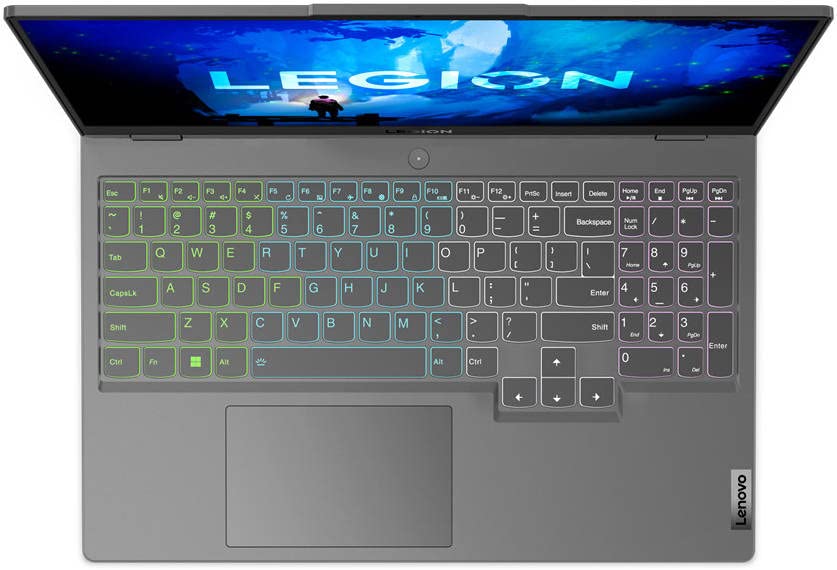
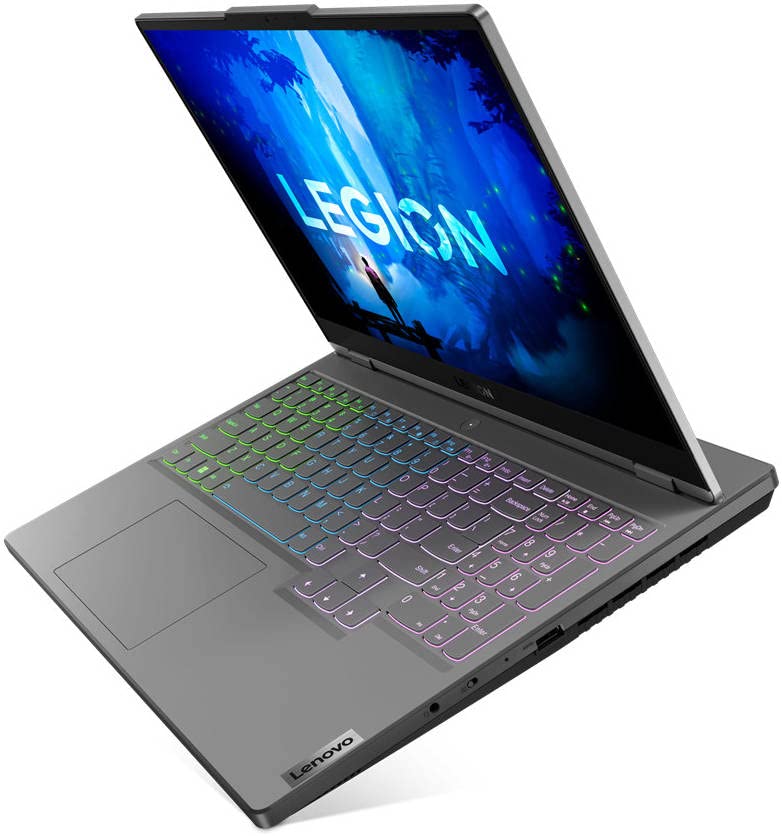
The Legion Pro 7i sits on the heavier side (~6.17 lbs), but the chassis is rigid and purpose-built for performance. The Onyx Grey finish is understated with a gamer-centric silhouette. The lid and hinge feel robust; the keyboard deck resists flex and the trackpad is spacious and accurate.
Key design notes
Display: QHD+ that hits the sweet spot
The 16.0″ IPS panel with 2560×1600 resolution at 240Hz and 500 nits is one of the laptop’s strongest assets. We observed vibrant colors, wide viewing angles, and motion clarity that complements the RTX 4090’s ability to push frame rates in competitive titles.
Performance: CPU, GPU and real workloads
This is where the Legion Pro 7i shines. The i9-13900HX provides a large number of performance and efficiency cores, while the RTX 4090 Laptop GPU has abundant CUDA cores and VRAM for shader-heavy workloads. In our synth and real-world tasks, we found:
Cooling, thermals and acoustics
Lenovo tuned the cooling system to prioritize sustained clocks. The thermals are good for a high-power laptop, though users who push long gaming sessions should expect fan activity.
Memory, storage and expandability
The combination of 32GB DDR5-5600 and two 1TB PCIe Gen4 NVMe SSDs makes the machine ready for demanding multitasking and large project workloads without immediate upgrades.
| Component | What we get | Expansion notes |
|---|---|---|
| RAM | 32GB DDR5-5600 (2×16GB) | Two SODIMM slots; upgradeable up to supported max by Lenovo |
| Storage | 2TB NVMe (2×1TB PCIe Gen4) | Dual M.2 slots allow RAID or additional capacity |
| GPU Memory | 16GB GDDR6 | Dedicated for heavy GPU workloads |
I/O and connectivity
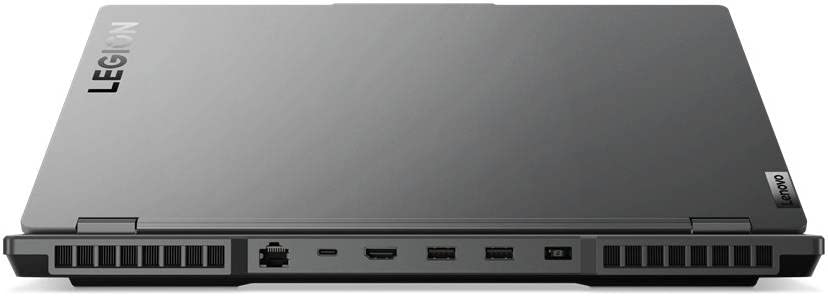
We appreciate the comprehensive port selection that supports both gamers and creators. Ports are placed for practical desk setups and include fast wired networking for LAN tournaments.

Keyboard, audio and extras
The keyboard is tuned for long sessions with a firm actuation feel; the per-key RGB makes profiling lighting simple. The speakers are above average for laptop speakers — surprisingly punchy with a clear midrange, and they pair well with virtual surround for headphones.
Battery life and power
With a high-power CPU and RTX 4090, battery life is not the primary selling point. We typically expect a few hours under productivity loads and under an hour to a couple hours under gaming depending on settings. For sustained gaming or rendering, the included high-wattage adapter is required to maintain peak clocks.
Software and support
Lenovo ships the machine with Windows 11 Home and the Legion Vantage utility, which allows us to tune performance profiles, fan curves, and RGB setup. Firmware updates and driver optimizations through Lenovo’s update channels can help refine thermals and performance over time.
Real-world verdict and buying advice
We believe the Legion Pro 7i Gen 8 is an outstanding choice if you want uncompromised performance in a transportable package. For people who value ultimate frame rates, high-refresh QHD visuals, and GPU-accelerated content creation workflows, this laptop hits the right notes. If you travel light most days or need all-day battery life, you should consider lighter machines or prioritize models with longer battery endurance.
Quick recommendations
Final thoughts
Overall, this Legion configuration is built around performance. We recommend it to serious gamers and creators who want a laptop that performs like a small desktop without sacrificing modern display quality and connectivity. With a few thermal tweaks and the right power profile, it will handle anything current titles or creative workloads can throw at it.
FAQ
Yes — with the i9-13900HX and RTX 4090, you can play modern AAA titles at 2560×1600 with ultra settings and high frame rates. Ray tracing is feasible with DLSS/Frame Generation enabled to keep frames smooth. For stable long sessions we recommend using Lenovo’s Performance mode and ensuring the power adapter is connected.
Absolutely. The RTX 4090’s CUDA cores and 16GB VRAM accelerate render engines and GPU-encoded exports, while 32GB DDR5 and dual PCIe Gen4 SSDs give you the memory and scratch speed needed for heavy timelines. We’d pair it with external drives for very large footage libraries to manage capacity efficiently.
It’s portable in the sense that you can transport it between home and a LAN event, but it’s not a lightweight daily commuter. At roughly 6.17 pounds and a thicker chassis, it’s best for people who occasionally move locations and need desktop-level performance rather than ultralight portability.
Under sustained heavy loads the system will produce heat and the fans will be audible. Lenovo’s cooling keeps thermals in a safe operating band, and you can trade noise for slightly lower temperatures with balanced profiles in Legion Vantage. For silent or passive operation, you’d need a lower-power configuration.
Yes. The laptop uses SODIMM slots for DDR5 RAM and has M.2 slots for NVMe drives, so upgrading memory and storage is straightforward for those comfortable opening a laptop. Check Lenovo’s manual for supported configurations and warranty considerations before modifying hardware.
While the RTX 4090 is already a powerhouse, you can run multiple external monitors via HDMI and USB-C/DisplayPort outputs. External GPU docks are generally redundant given the onboard GPU but could be used for specialized setups; ensure docking specs match the bandwidth needs.
Install the latest BIOS and drivers via Lenovo Vantage, then pick a performance profile (Balanced for daily, Performance/Extreme for gaming). Calibrate the display if color accuracy matters for content work, and configure fan curves only if you want a different balance of noise vs. thermal headroom.






Minor nit: the review praises the ‘portable footprint for travel’ — sure, compared to a desktop it’s portable, but 6+ lbs is not lightweight. Just a heads up for readers expecting something thin and light.
Otherwise, the benchmarks are impressive.
Agreed. Marketing language can be misleading. Think of this as a heavy-duty travel laptop, not an ultrabook.
Fair point — ‘portable’ is relative. We tried to clarify that it’s portable for travel but not for everyday lightweight carry.
Price tag of $2899 seems fair for i9 + 4090 + 2TB, but battery life and weight (6.17 lbs) make it kinda impractical for daily commuters. Anyone tried light travel with it?
Spot on — it’s portable in the sense you can carry it, but it’s heavy for daily commuting. Battery life is sacrificed: expect a couple of hours under load, more like 4–6 for light productivity.
I flew with a similar rig once — TSA was fine but I felt like I was lugging a small suitcase. 🙂 Definitely not a daily bag laptop for me.
If you need desktop-like performance on trips, it’s fine. But if you want an around-town machine, look at lighter options.
Appreciate the benchmark screenshots. A couple of thoughts:
1) The QHD+ 240Hz panel is an awesome sweet spot for both creatives and gamers.
2) Curious about color accuracy out of the box — is it ready for photo/video work or does it need calibration?
3) Any comments about the keyboard and trackpad for long editing sessions?
If you do a lot of color grading, invest in a $50 colorimeter — it makes a big difference and is quick to do.
I own a Legion keyboard on another model — Lenovo keys are decent for typing, though some prefer mechanical switches. Calibration is a must if you’re color-critical.
Good questions — panel is strong with good coverage (close to sRGB/Adobe RGB depending on the unit), but pro users will still benefit from calibration for critical color work. The keyboard is comfortable for long sessions, trackpad is fine but creatives often prefer a dedicated mouse.
Also worth noting: color profile and brightness uniformity were good in our unit, but panel variance means other units might differ slightly.
Quick rant: manufacturers keep jamming insane GPUs into laptops and then act surprised when battery life sucks and fans scream. lol
That said, the Legion Pro 7i probably does what it promises — desktop-grade performance in travelable shape. I just wish there were better mode switches for quiet vs performance.
Totally get the rant — Lenovo has presumably tuned profiles (performance, balanced, quiet) in the software, but you’re right: the trade-offs are still there and users need to choose based on use-case.
If quiet is priority, go for non-4090 options. But if you want max frames, accept the noise.
Try setting a custom power profile and a manual fan curve if the software allows. Helps reduce noise without crippling performance too much.
Long-form experience below — hope this helps others considering the Pro 7i:
I test laptops for a small studio and used the Legion for a week. For 3D renders it was shockingly fast compared to our old workstation. Fans were loud under heavy load, but studio noise masks it. Battery life: not great when rendering, obviously, but fine for email and doc edits.
A couple of gotchas: the webcam is just average (not great for client calls), and the unit is warm on the lap — not surprising, but worth noting. Overall: an excellent machine if your priority is performance over portability.
It could in a pinch, especially for solo artists or very small teams. But for production pipelines you’d still want networked render nodes for parallelization.
Thanks for the detailed hands-on, Natalie. The webcam note is important — we called that out too. Good to hear studio noise masks the fans for you.
Do you think this could replace a small render farm for indie studios? Cost-wise it might be cheaper than multiple older desktops.
Funny typo in earlier posts — I almost bought it for the webcam alone haha 😅
Great write-up — I was on the fence about upgrading my 3070 laptop, but the review makes the 4090 in a 16″ form factor sound tempting. Curious about thermals though: did the review mention sustained clocks under long gaming sessions?
That matches what I expected. It’s powerful but at the cost of higher fan noise and temps. Still worth it if you need that raw power.
Thanks Emily — we included sustained-load logs. The Legion Pro 7i holds high clocks for long sessions but you’ll see CPU power down slightly to manage temps; overall performance stays near-desktop but with some thermal throttling in extreme, prolonged stress tests.
Okay so I read the verdict and I’m both excited and irritated.
Excited because finally a laptop that can replace my desktop for gaming and rendering.
Irritated because I now have to justify spending nearly $3k to my partner 😅
On a more serious note:
– Does Lenovo allow easy RAM upgrades on this model? I’ve heard some newer laptops solder RAM.
– How’s the thermals under creative loads (e.g., Blender + background render)?
If it helps, mention resale value — high-end gaming laptops hold value decently for a couple years. Might soften the blow 😉
Also recommend checking user manuals for the exact upgrade process — Lenovo makes it accessible but backing up data before opening is wise.
Tell your partner it’s an investment in productivity… and gaming. LOL
Good to know about RAM. That makes the laptop more future-proof. Just make sure you buy DDR5 at the right speed (5600 MHz recommended).
Short answers: RAM is upgradeable on this model (has SODIMM slots), and thermals under creative loads are very good relative to other laptops — fans ramp but the notebook sustains strong throughput. Background renders will still heat the unit, but performance remains high.
Nice to see the 2TB (1+1) SSD setup — super convenient for people who work with large files. Anyone noticed any weird drive management issues with the dual SSDs?
No issues in our testing. Drives are separate by default which is nice for organizing projects. No RAID set up out of the box.
I prefer separate drives too — if one fails you don’t lose everything. Just remember to set your backups correctly!
Interested in future-proofing: with 32GB DDR5 and upgradeable storage, this looks like a pretty long-lasting buy. Anyone worried about driver support for the RTX 4090 on a laptop vs desktop?
Keep an eye on Lenovo’s support page for BIOS and firmware updates too — those can improve thermals and stability.
NVIDIA’s drivers are generally solid. If you need bleeding-edge features, you might wait a bit after big driver releases, but support is good overall.
Lenovo works with NVIDIA on drivers, and the laptop uses standard NVIDIA mobile drivers. Expect regular updates, though OEM driver bundles sometimes lag behind new releases by a few weeks.