

Pocket 4K power that follows you — cinematic results with a few travel-friendly compromises.
Ever shown up at a jaw-dropping view and ended up with shaky, boring footage because lugging a full-size drone felt ridiculous? We’ve been there — wanting cinematic 4K clips without the registration headaches, bulky controllers, or airline drama.
Enter the DJI Neo 4K Mini Drone: a 135g, controller-free flyer that promises stabilized 4K video, subject tracking, and palm takeoff — all for about $199. In our hands-on testing we found it to be a superb pocketable option for travel and casual filmmaking, though short flight times and limited obstacle sensing are real trade-offs. Read on as we break down image quality, flight performance, app quirks (yes, Android sideloading), and whether this little drone earns a spot in our travel kit.
DJI Neo 4K Mini Drone, 135g Portable
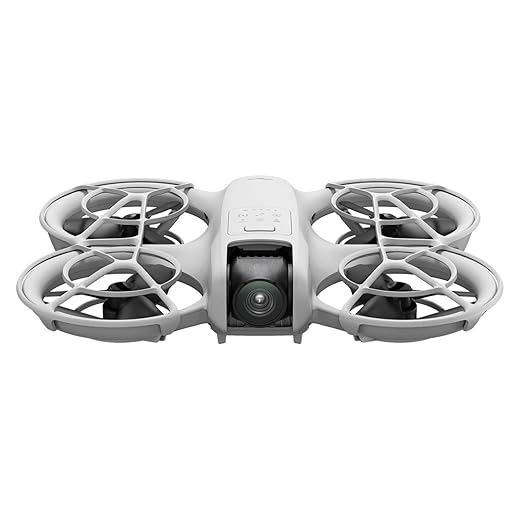
We found it to be a superb pocketable option that balances image quality with convenience — ideal for travel and casual filmmaking. Its lightweight build and smart flight modes make capturing cinematic clips straightforward, though battery life and lack of full obstacle sensing are trade-offs.
Quick Overview
We love how this mini quadcopter squeezes advanced imaging and accessible controls into a palm-sized package. Designed for travelers, casual creators, and hobbyists, it combines 4K footage, DJI-grade stabilization, and flexible control options — including controller-free palm takeoff — in a sub-135g chassis that’s easy to carry and generally regulation-friendly.
Design and Portability
The Neo’s shell is polycarbonate and feels durable for its size, with foldable arms that tuck and protect the propellers during transport. The whole craft is light enough to toss into a daypack or even a larger jacket pocket, and the included full-coverage propeller guards encourage confident indoor flying.
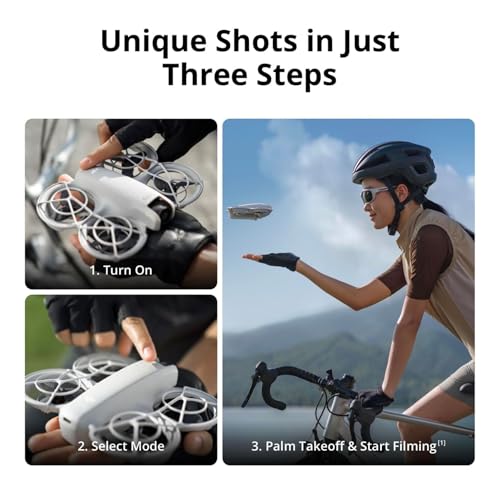
The ergonomics favor simplicity: grab-and-go setup, intuitive hand launches, and minimal accessory overhead unless you opt for extra batteries or a charging hub.
Camera, Gimbal, and Image Quality
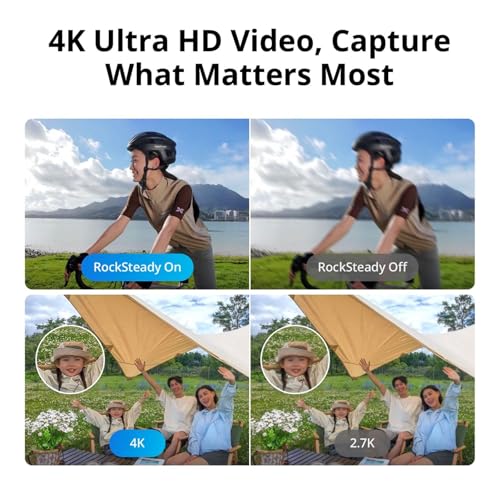
We were impressed by the 4K UHD capture in this size class. The gimbal stabilization uses DJI’s algorithms to keep footage smooth even in breezy conditions. The camera sensor produces vibrant colors and solid detail for social media clips, travel vlogs, and simple landscape shots.
| Attribute | What We Noted |
|---|---|
| Video resolution | True 4K UHD — great for social and casual editing |
| Still photos | 12 MP — decent dynamic range for daylight shots |
| Stabilization | Effective for handheld-like smoothness in many scenes |
While we love the results for most users, pro filmmakers will find limits in sensor size and low-light performance compared with larger drones. The Neo excels under good lighting and when you want steady output without fuss.
Flight Performance & Controls
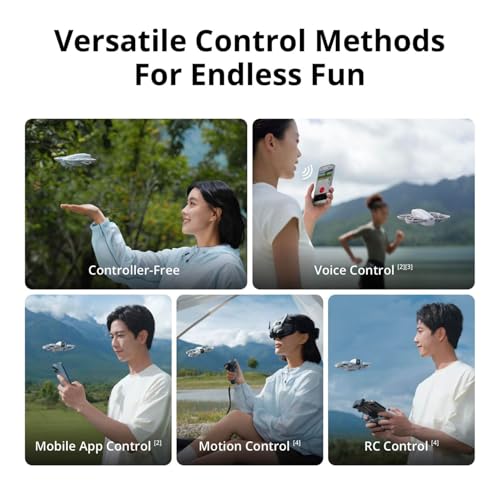
This is where Neo shines for beginners: the flight experience is predictable, responsive, and forgiving. You can fly controller-free with hand gestures and palm takeoff/landing, use voice commands in supported languages, or connect via the mobile app. For more traditional flying, an RC unit is compatible and extends range and responsiveness.
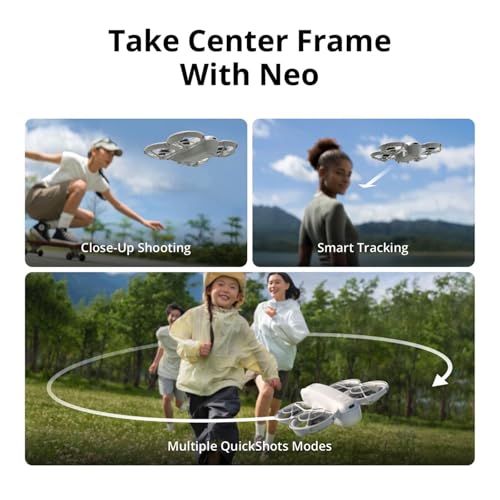
We enjoyed the subject tracking and QuickShots modes — they make it easy to produce cinematic sequences without manual piloting expertise. However, remember that the drone lacks full obstacle-avoidance sensors; it’s agile but still needs a cautious pilot in tight wooded or cluttered environments.
Battery, Accessories, and Flight Time
Battery duration is the most common compromise with pocket drones. Typical flight windows range from about 10 to 18 minutes per battery depending on wind and maneuvers. DJI’s multi-battery combos and two-way charging hub are practical add-ons if you plan extended outings.
If you plan to shoot all day, factor in spare batteries or rapid charging solutions. For quick holiday clips and spur-of-the-moment shots, the stock battery is fine — but it’s worth budgeting for at least one extra pack.
Intelligent Flight Modes and Creativity Tools
The Neo’s suite of smart modes lets us focus on composition rather than stick work. Subject tracking, automated QuickShots, and simple panorama/stitching tools are designed for social creators who want impressive output without a steep learning curve.
These tools unlock creative possibilities quickly, especially when combined with the compact form factor that lets us capture from vantage points we otherwise wouldn’t consider.
Safety, Durability, and Regulatory Notes
Built-in propeller guards and a soft startup help prevent minor mishaps, which is great for indoor flights or learning environments. At 135g, the craft often avoids stricter registration rules, but local laws do vary; we always recommend checking regional regulations before flying.
Also note the activation and app access: on some Android devices the DJI Fly app must be downloaded from DJI’s site rather than the Play Store. That adds setup steps and a momentary privacy consideration for some users.
Who Should Buy This
We recommend the Neo to travel vloggers, hikers, weekend adventurers, and first-time drone owners who value portability and automatic capture tools over pro-level imaging. If you’re building a kit for long cinematography sessions or need advanced obstacle sensing, a larger model may be a better fit.
Practical Tips & Setup Checklist
Final Thoughts
We appreciate how the Neo democratizes aerial video: the learning curve is short, the hardware is thoughtfully compact, and the footage quality punches above its weight. For anyone prioritizing portability and quick cinematic clips, it’s a compelling choice — provided you accept the trade-offs in flight time and sensing.
FAQ
Because the drone weighs around 135g, many regions don’t require FAA-style registration for hobbyist flights. However, local laws differ worldwide, so we recommend checking your country’s rules before flying in public spaces.
Expect roughly 10–18 minutes per battery depending on wind, speed, and maneuvering. Aggressive flying or cold temperatures will shorten that. We usually plan on two batteries for a comfortable half-day outing.
Yes — it supports controller-free operation with palm takeoff/landing, voice commands in supported languages, and app control. For longer range or lower latency, adding an RC is beneficial.
Absolutely. The stabilized 4K is perfect for social posts and YouTube vlogs. It won’t replace larger-sensor cinema drones for professional color grading, but for most online creators, the results are more than sufficient.
This model uses stabilizing and safety features, including propeller guards, but it doesn’t have full 360° obstacle avoidance. We recommend cautious piloting in confined or densely wooded areas.
Bring extra batteries and a two-way charging hub or a USB-C PD power bank to recharge in between flights. Swapping batteries is the fastest way to keep shooting all day.
Initial activation is straightforward if you download the DJI Fly app ahead of time. Android users may need to sideload the app from DJI’s website, which adds steps — we advise doing this at home before your first outdoor session.
The full propeller guards and agile controls make it suitable for casual indoor FPV-style fun, but take care because there’s no full obstacle sensing. We suggest slow, deliberate flights and practicing basic maneuvers first.




Really enjoyed the review — balanced and practical.
A few additional things I noticed after a weekend trip:
– The built-in propeller guards are a lifesaver for tight hotel balconies.
– Video color straight out of camera is a bit flat, but easy to grade.
– Subject tracking is fun but sometimes drifts when the subject moves behind things.
Would be great if DJI offered an optional lightweight controller for this model in the future.
Agree on grading — a quick LUT made a big difference for my travel clips.
One more tip: enable any contrast or color profiles in the app if you plan to grade later; flatter profiles give more headroom for color work.
Thanks, Grace — great field notes. Color grading is a common step for many users; we liked how easy it was to tweak in post. And your suggestion about an optional light controller is something we’ve heard from other readers too.
Just got mine last week and honestly I’m impressed — the footage looks way better than I expected for a $199 drone. The stabilization does most of the heavy lifting.
Battery life could be better but for quick travel clips it’s perfect.
Palm takeoff is actually kinda fun 😂
Would recommend for casual users and holiday videos.
Thanks for the note, Emily — glad it’s working well for you! To clarify for others: real-world flight time tends to be in the low-20 minute range on a single battery depending on wind and recording settings.
Nice — did you notice any issues with Wi‑Fi range when using it with a phone? I’m worried about interference in parks.
I’ve used it in a busy park and got a few hundred meters before the feed got choppy. Still usable for short scenic shots though.
Great review. Quick question: since it’s 135g, do I still need to register it in the US/UK? The article hints at being regulation-friendly but doesn’t spell out registration.
Yep, handled mine same as Jason — no registration needed here, but remember to follow local flight rules (no-fly zones, line of sight, etc.).
Good question — rules vary by country. In the US, the FAA generally requires registration for drones over 0.55 lbs (250g), so at 135g this model often avoids registration for casual hobbyists. Always check local rules before flying.
Not impressed with the battery spec — 1435 mAh sounds small. Seems like DJI sacrificed endurance for weight. Also, “controller-free” sounds great until your phone battery dies mid-flight. Kinda sketchy tbh.
If you plan longer flights, consider a different model with a controller and bigger battery. The Neo is for quick snaps and travel convenience.
You’re right to be cautious. The light weight constrains battery size, and while flight time is reasonable for short shoots, it’s not a full-day solution. Carry spare batteries and a power bank for longer sessions.
I always bring two spare batteries and a small power bank. Feels annoying but solves the ‘mid-flight phone dead’ thing.
Agree on the phone issue — I started using a dedicated cheap phone (old model) for drone control to avoid killing my main device.
Sketchy is harsh but fair — it’s a trade-off: portability vs endurance.
Also a heads-up: the included Type-C PD cable helps with faster charging if you have a PD charger, but charging between flights still takes time.
I appreciate the compact build but the lack of full obstacle sensing worries me. A few thoughts:
1) For urban shooting it could be risky — you need to be extra cautious.
2) The subject tracking is handy, but don’t rely on it near trees.
3) As a travel camera it’s brilliant, though — really lightweight and fits in a jacket pocket.
4) Would love to see better low-light performance in a future revision.
For urban shots I set a conservative max altitude and keep it slow. Not perfect, but reduces surprise collisions.
Good points, Liam. The Neo is aimed at casual filmmakers, so DJI trimmed some advanced sensors to keep it light and cheap. If you fly around obstacles, stick to open spaces or manual control when needed.
Agreed — used subject tracking on a trail and it bumped into low branches twice. Learned to toggle manual control in wooded areas.
Also worth noting: the included prop guards help for accidental bumps, but they’re no substitute for sensors. Treat them as a last-resort safety net.
Low-light could be better, true. Daylight 4K looks great though — I used ND filters and got some cinematic pans.
Does anyone know if the camera supports manual exposure in the app or is it mostly auto? Trying to plan a sunset shoot.
The app gives some manual controls (exposure compensation, shutter and ISO adjustments depending on mode), but it’s not as deep as pro-level drones. For sunset, try manual shutter/ISO and use ND filters if shooting bright areas.
You can tweak exposure settings but there’s no full RAW workflow on this model — still, you can get great golden-hour footage with the right settings.
Love the idea of controller-free flight and palm takeoff — but does the lack of a physical remote make precise framing harder? Anyone tried gimbal proxies or using a small tripod?
I clipped my phone to a selfie stick with a small tripod base — gave me more control and less shaky inputs.
Good question. App control is flexible but can feel less tactile than a physical controller for fine moves. Some users pair a small external controller (if compatible) or use a phone clamp on a mini tripod for steadier framing while standing.
Also, remember the Neo has stabilized video which compensates for some framing wobble, but it won’t replace skilled gimbal operation for pro-level moves.
If you’re used to joysticks, the app takes a little practice. QuickShots help with smooth pre-programmed moves though.
Pocket cinema for $199? More like pocket toy with delusions of grandeur. Still, makes a cute insta gadget. 😉
Been waiting for a palmtakeoff drone since forever. If the palm takeoff actually works reliably, I might buy one just for that party trick 😅
Is it easy for beginners?
Palm takeoff is designed for beginners and generally works well, but practice in a controlled environment first. Make sure the prop guards are installed and keep the drone level when attempting a hand launch.